Calculating the difference between two date/time fields
To calculate the difference between two date/time fields, create hidden fields that convert the time/date values gathered by time/date fields into a specific format using FORMAT-DATE. Then create another hidden or visible field with a dynamic value that uses the DATEDIFF function to calculate the difference between the two hidden fields.
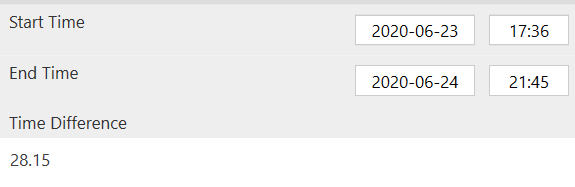
In the below example, {{timeDiff}} is formatted with 'HH' to show hours. This can be modified to show the time difference in another format, such as hours and minutes, etc. Please see this article for more detail on data/time format codes.
startTimeHidden:
FORMAT-DATE({{startTime}}, 'yyyy-MM-dd HH:mm:ss')
endTimeHidden:
FORMAT-DATE({{endTime}}, 'yyyy-MM-dd HH:mm:ss')
timeDiff:
DATEDIFF({{StartTimehidden}}, {{EndTimeHidden}}, 'HH')
Related Articles
Calculating the Difference Between Two Dates
You might have a scenario where you need to capture the total time a user took to complete a form or the difference between the start and end times of an activity based on user input. This is where the DATEDIFF() function comes in handy. It can be ...Calculating the Duration/Time elapsed between two form fields
For some questionaire/survey-type scenarios, you may wish to track the time it takes the user to fill out a Form, or maybe a section in the Form. This is done by storing a corresponding start and end date/time value, with these values being set when ...Date & Time Field
When needing to capture temporal data, use our Date/Time field. As the name implies, this Form field allows you to collect dates, times and date + time values. As with most Form fields, the Date/Time field type has a set of common properties you can ...Form Captured Date & Time Values
Forms can capture Date, Time, or combined Date/Time data for each record. Date only or Time only fields Date only and Time only fields are captured in the local device time, but without any timezone information. As such these are always displayed as ...Date and Time values in Form entries
Dates and times are captured as follows on form entries: Date only and Time only fields are captured in the local device time, but without any timezone information. As such, these are always displayed as the raw, local time values, without any time ...