Creating Forms with AI
Instead of building from scratch, Generate Forms by describing what you need – using text or voice – and our AI will create a robust starting point. This reduces your setup time and delivers a working solution faster.
Then, using Conversational AI directly in the form designer. Tell the AI to modify your design, add fields, apply logic, or even globally configure field cosmetics.
This interactive capability allows users to build dynamic forms using natural language instructions, making digital solutions effortlessly accessible to all skill levels.
However, please remember that AI can make mistakes, so always double-check the results.
Generate Form
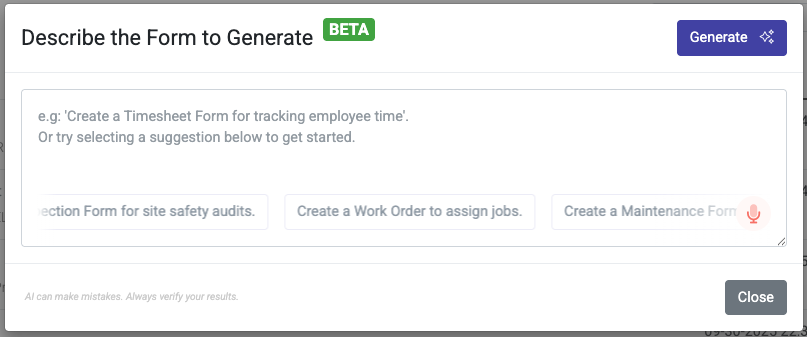
The “Generate Form” feature allows you to rapidly create the initial structure of any form by simply providing a descriptive prompt. Think of it as having a skilled assistant who understands your intent and immediately lays the groundwork. This significantly reduces initial setup time, allowing you to focus on refinement rather than construction.
How it Works
You articulate your form’s purpose, the information you need to collect, and any specific elements you envision. The AI then processes this input and, within moments, presents you with a functional draft of your form.
To make the most of “Generate Form,” your prompts need to be clear and concise.
Good Prompts
Good prompts are clear, specific, and contextual. Here are a few examples to guide you on your prompting journey ahead.
- “Create a timesheet form for my field workers. I need fields for full name, start time, finish time, location, a drop-down for work carried out (New Installation, Repair, Warranty Service), and a checkbox for the number of parts used.”
- “I need an inventory capture form with fields for name, location, type, stock count, unit price, and allow for an image of each item.”
- “Generate a pipe inspection checklist. Include sections for interior, exterior, and overall pipe integrity and an upload field for a certificate in PDF format.”
Why these are good: They specify the form’s purpose, list key fields, and sometimes even suggest the type of input control (e.g., “drop-down,” “checkbox”).
Bad Prompts
Bad prompts are vague, ambiguous, lack details, or imply knowledge. Here are a few examples categorized by the specific issue they present.
Vague and Unspecific Prompts
These prompts provide no clear direction, making it impossible for the AI to generate a useful form.
- Make a form for my business.”
(What kind of business? What is the form for?)
“Build something that gets information from people.”
(Extremely vague; could be a survey, a contact form, a registration, a quiz, etc.)
“Make a simple form.”
(What is “simple” to you? The AI has no context for what fields or purposes are needed.)
Prompts with Ambiguous or Conflicting Information
These prompts contain contradictory or unclear requests, leading to confusion for the AI.
- “Generate a form with a text box for the name and a drop-down menu for their full name.”
(The AI will be confused about which input type to use for the “full name.”)
“I need a short survey with a lot of questions.”
(Contradictory. The AI can’t determine what “short” and “a lot” mean in relation to each other.)
Prompts Lacking Context or Purpose
These prompts don’t explain the “why” behind the form, so the AI can’t make smart decisions about the fields or structure.
- “I need a form with fields for ‘address,’ ‘phone number,’ and ’email’.”
(The AI will generate these fields, but it won’t know if it’s for an inspection form, a shipping address, or a job location, leading to a poorly structured form.)
“Generate a form with a list of parts.”
(Is this for a hazardous material inventory? A checklist of parts used on site? The AI has no idea what other fields might be relevant, like ‘type,’ ‘quantity,’ or ‘purchase/sell by date.’)
Why these are bad: They provide almost no information, forcing the AI to guess or generate a generic, unusable form. The AI is powerful, but it’s not a mind-reader!
Conversational AI
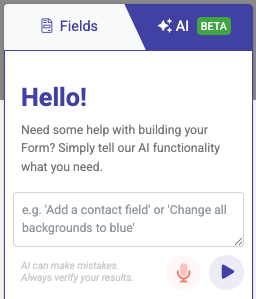
Once your initial form is generated, the “Conversational AI” feature can take over. Instead of manually adding fields and navigating settings, you can talk or type to the AI, asking it to modify, enhance, or add logic to your form.
How it Works
Imagine you’ve generated your basic form. You can then interact with the AI directly within the form builder. “Add a field here,” “Make this required,” “Only show this question if that answer is selected” – the AI understands and executes your commands.
Let’s say you’ve generated a timesheet form using “Generate Form.” The following are examples of interactions with Conversational AI.
Adding Fields
- “Add a new field for ‘Company Name’ after the ‘Client Name’ field.”
- “Insert a phone number field, and make it required.”
- “Add an option to select a work status from a list of three options: ‘Complete’, ‘In progress’, ‘Delayed’.”
Editing Fields
- “Change the ‘timesheet id’ field to ‘timesheet number’.
- “Update the company name field’s placeholder text to ‘enter company name here’.”
- “Enable address lookup on the job location field”
Applying Logic
- “Only show the ‘Notes Photo’ field if the ‘Notes’ field is not blank.
- “If ‘Yes’ is selected on the ‘Is any work outstanding’ field, then make the ‘What is outstanding’ field required.
- “On page 1 in the ‘total’ field. Count the number of fields that are not blank.”
Related Articles
Creating Formulas in Forms
Most advanced Form functions involve the use of a formula. As such, it is crucial that you understand how to create formulae to get the most out of our advanced features. Field Data Names The unique data name of a field can be referenced in other ...Designing Forms
Designing Forms After creating a new Form, you’ll be taken to the Form’s Designer. Where you can create, test with specific users, and publish the form to all users. You access the Form Designer thereafter on the Forms page by hovering over a form ...Creating Updating & Deleting Data Source Rows
Often, you may want to allow the user to create, update, or even delete rows on your Data Sources. Our platform supports this by setting up a Form in a few ways. Note the following functionality only works with existing data sources. Hence, you must ...Voice Fill with AI
In many demanding work environments, physical interaction with a smartphone screen is simply not feasible. Whether it’s due to the inherent dangers of hazardous zones or the practical impediments of gloved, dirty hands, there are critical moments ...Photo Fill with AI
Imagine a world where the essential data captured on a clipboard in a hazardous plant or a tally sheet on a construction site can be instantly digitized with a simple photo. Photo Fill with AI is built for these realities, empowering workers and ...