Flow Layout Field
The Flow Layout field lets you arrange fields side-by-side in a flexible column or grid layout.
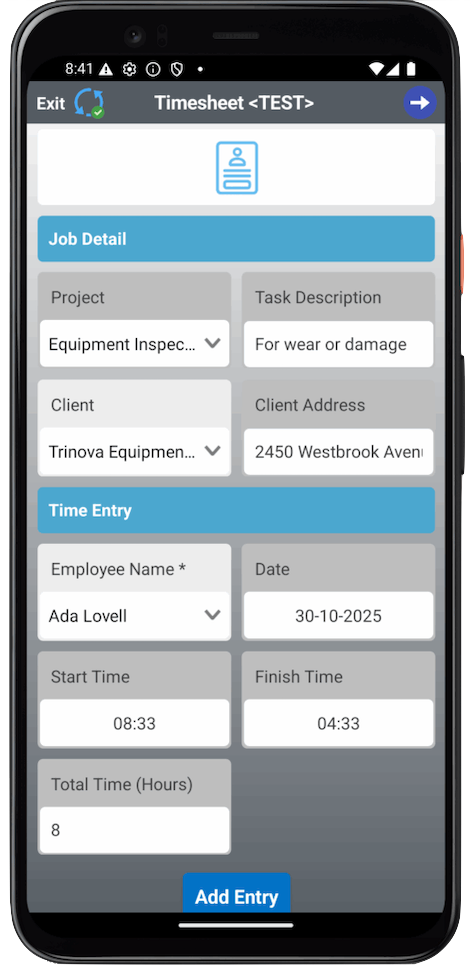
Essentially, it’s a container that holds multiple fields. Those fields are displayed side-by-side based on the device: up to 2 columns on mobile and up to 4 columns on tablets.
Use Cases
This field is ideal for forms that require a different structural approach, especially when field capture data doesn’t require large input areas. Stacking fields side-by-side in columns can use a device’s screen real estate more efficiently.
Key examples include:
- Pre-start inspection forms: Display measurements such as engine oil level, hydraulic oil level, and coolant level. On mobile, fields appear in 2 columns; on tablets, they can be displayed in 2–4 columns for easier comparison and readability.
- Equipment overview forms: These forms present key details (serial number, operating hours, condition) in a clean multi-column layout.
- Photo or file upload sections: Organize multiple attachments in an evenly spaced grid.
- Status dashboards: Align condition indicators (Good / Fair / Poor) or metrics side by side for quick assessment on larger screens.
Flow Layout ensures consistency, clarity, and a professional appearance across devices.
Unique Properties (How To Configure It)
| Property | Description |
| Responsive Breakpoint | Defines the screen width threshold separating mobile and tablet devices: – Screens up to the breakpoint width are treated as mobile. This property determines which column configuration is applied. |
| Mobile Columns | Specifies the number of columns displayed on mobile devices (screens up to the breakpoint). – Fixed value: 2 columns. |
| Tablet Columns | Specifies the number of columns displayed on tablets (screens above the breakpoint). – Allowed values: 2 to 4 columns. |
Best Practices
To ensure optimal usability and a consistent visual experience across devices, follow these best practices when configuring Flow Layout:
Recommended Guidelines
- Group related fields logically: Place fields with a shared purpose (e.g., contact info, measurements) in the same Flow Layout container.
- Keep visual balance: Use fields of similar type and size to ensure clean alignment.
- Limit column count appropriately: Configure 2–3 columns for most use cases to preserve clarity and ease of navigation.
- Test across devices: Confirm proper wrapping and spacing for each layout.
Common Mistakes to Avoid
- Mixing dissimilar controls: Do not position large input areas (e.g., multi-line text fields) beside small elements (e.g., toggles).
- Overcrowding: Avoid too many columns or tightly packed layouts.
- Uneven content: Inconsistent field lengths or images cause misalignment.
- Skipping responsiveness checks: A clean tablet layout may look cluttered on mobile.
Related Articles
Twilio Connection and TwilioForm Connector
A Twilio Form Connector helps you send and manage short messages programmatically. Our platform lets you quickly and easily send text messages when a Form entry is uploaded and/or a Task Connector's triggering condition occurs. Before you add a ...Email- Form Connector
One of the most common requirements is to be able to email a copy of the Form entry to various people. For example, if a building inspection is performed, you may want to email a Certificate of Inspection to the building owner. Or, if you are taking ...