How do I ensure that my users' data is up to date?
Submitting an old version of a Form can result in various issues from Connector errors to duplicate Auto-Numbers on the back end. To avoid these potential problems, consider checking the "Wait for Sync on Load" checkbox within the Advanced Options section of Apps > App Setup (highlighted below):
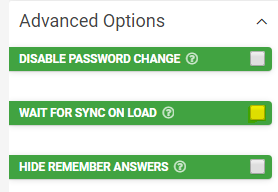
By default, the app will perform all data syncing in the background, allowing the user to immediately start working while the sync is still in progress. When this option is enabled, however, the app will instead display a blocking overlay when syncing, forcing the user to wait for the sync to finish. This will only occur when the user logs into the app or resumes the app from the background; other background sync intervals will continue as normal. This is useful for cases where you must ensure the users have the latest data before they start working with the app.
Related Articles
Workflow A Form Entry Between Users (Process Steps)
Often, a business process requires more than one person to complete it. In these scenarios, just capturing a Form entry is not enough: multiple users must review, approve, reject, or update it. The Process Step field type found in the Form Designer ...Best Practices- Data Sources
When using data sources, there are efficient and inefficient ways of structuring, binding, and storing your data. However, we'll focus on efficient usage by establishing a few basics, how to structure your data, and best practices for specific ...SQL Server Data Source Connector
After adding and authenticating an SQL Server Connection, you can add Form Connectors to push data to a database or pull data from a database using Data Source Connectors. Our platform lets you quickly and easily connect your data sources to a SQL ...Platform Sync - Data Source Connector
Platform Sync (previously known as Hosted GET) lets you set up a data source connector for any external database on any external system for which we do not have a live connector. While it is a bit more technical to configure, it does allow you to get ...Date/Time Field Type
TABLE OF CONTENTS Basic Properties Data Name Title Text Hint Text Date/Time Type Working with Date & Time values in formula and bound Data Source scenarios How to get Date & Time values stored in your local time zone Layout & Styling Field Layout ...