Web Forms (Add-On)
Our Web Forms add-on is designed to facilitate easy and efficient data collection from users, whether they are part of your organization or external participants. This tool is particularly useful for scenarios where quick data capture is essential and does not require users to log in.
We offer 250 included monthly submissions, catering primarily to those who do not regularly use your applications. These web-based forms enable submissions through a browser, allowing staff, guests or visitors to provide information without needing a user account.
The forms are versatile, supporting various field types to capture and display necessary information on a single page, with a capacity for up to 50 fields. You can easily share these Web Form links with anyone, enabling them to fill out and submit forms anonymously. This process can initiate internal business workflows or update important details.
For instance, if your team needs to access an incident report form, those with regular access to the mobile app can submit it effortlessly. However, for staff who do not require frequent app access but still need to submit reports, a Web Form is a convenient solution. Remarkably, regular app users can also submit this form directly within the mobile app.
Another practical use case is customer onboarding. When you need to collect details from a new customer, simply send them a Web Form. This streamlines the process of updating your customer data source.
Our Web Forms add-on opens up new possibilities, potentially broadening the range of applications for your organization within our platform.
Enable Add-On
To start using Web Forms, please reach out to us. eForms Mobile needs to activate the add-on for your organization's platform before you can begin utilizing this feature.
Create a Web Form
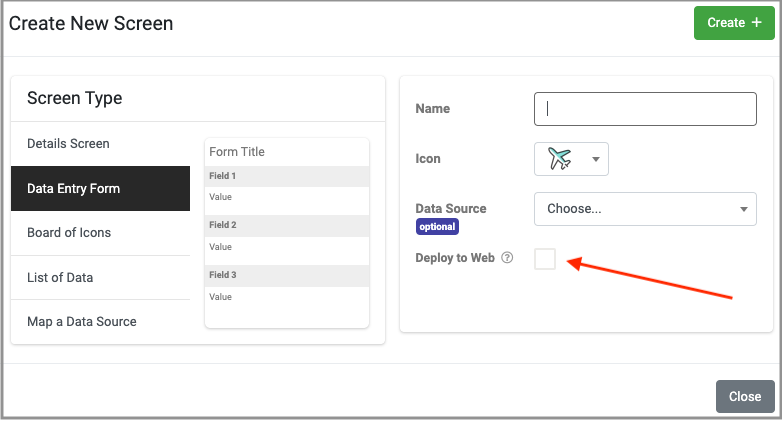
After the Web Form feature has been activated on your platform, proceed to set up a new Data Entry Screen, just as you would typically do for an App Form. You can do this on the Forms/Screens page, accessible via the Platform Side Menu (Design Tools > Forms/Screens). When doing so, make sure to select the "Deploy to Web" option. This action will open the Web Form Designer, allowing you to create your web-based form.
Design Considerations:
- Single-page Web Form
- Max 50 fields per web form
- No location-based data capture (i.e, Location field, and field location properties)
- Upload option required (added by default when adding a new web form)
- Anonymous form submissions (by Web Form user in Data Feed views)
- Free 250 submission upload limit (billable submissions thereafter)
Related Articles
GET Screen (Search)
TABLE OF CONTENTS Parameters Example The Screen API returns the Published version of matching Forms or all versions of a specified Form. On the Cloud, this API is available via SSL-secured HTTPS connection using the REST GET verb. The format query ...GET Screen (Map Search)
The GET Screen (Map Search) API returns the Published version of matching Map Screens or all versions of a single specified Map Screen. On the Cloud, this API is available via SSL-secured HTTPS connection using the REST GET verb. The format query ...GET Screen (Details Screen Search)
The GET Screen (Details Screen Search) API endpoint returns the Published version of matching Detail Screens or all versions of a single specified Detail Screen. On the Cloud, this API is available via SSL-secured HTTPS connection using the REST GET ...POST Screen
TABLE OF CONTENTS Parameters Example The POST Screen Form API allows you to create a form programmatically rather than in the designer. On the Cloud, this API is available via SSL-secured HTTPS connection using the REST POST verb. The format query ...GET Screen (Listing Screen Search)
TABLE OF CONTENTS Parameters Example The GET Screen (Listing Screen Search) API returns the Published version of the matching Listing Screen or all versions of a specified Listing Screen. On the Cloud, this API is available via SSL-secured HTTPS ...