Nesting Repeatable Data - Nested Repeating Tables
Capturing repeatable data using a repeating Table field is amazing, However, sometimes, you need to group data within other data, like putting a smaller box inside a bigger box.
In the app builder, you can do this by nesting one Table Field inside another Table Field, and our drag and drop feature makes doing this extremely easy.
Use Cases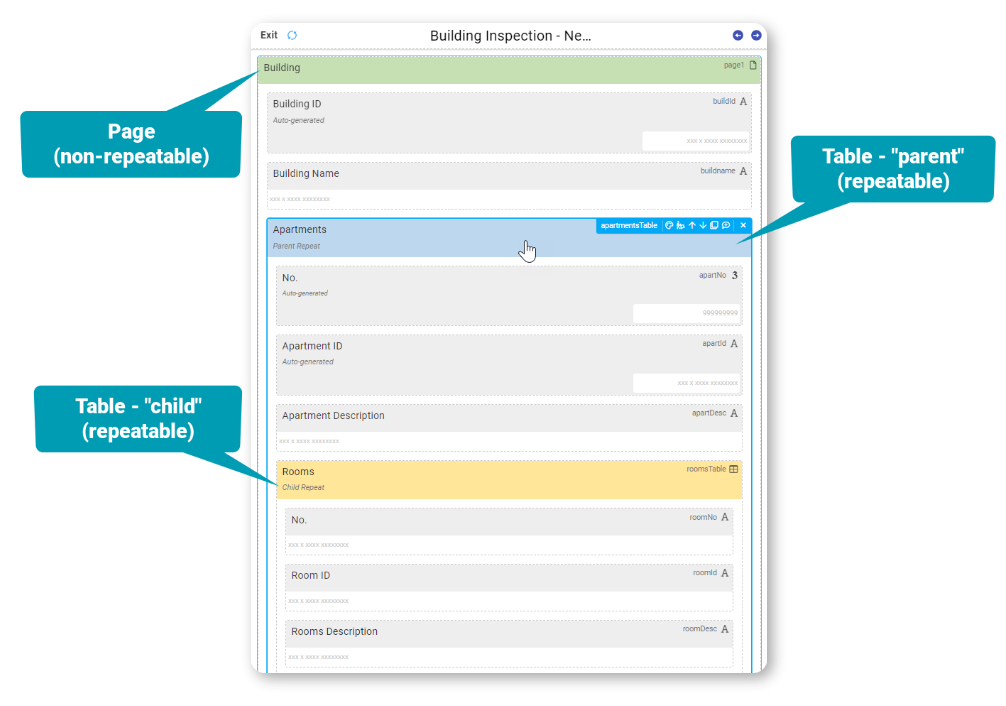
Imagine you are manager a building with may apartments, each with it's own rooms, or fixing equipment that has many parts, each with it's own sub-parts.
For any task needing repeating data that also needs a set of repeating data within it, you can use the nesting technique.
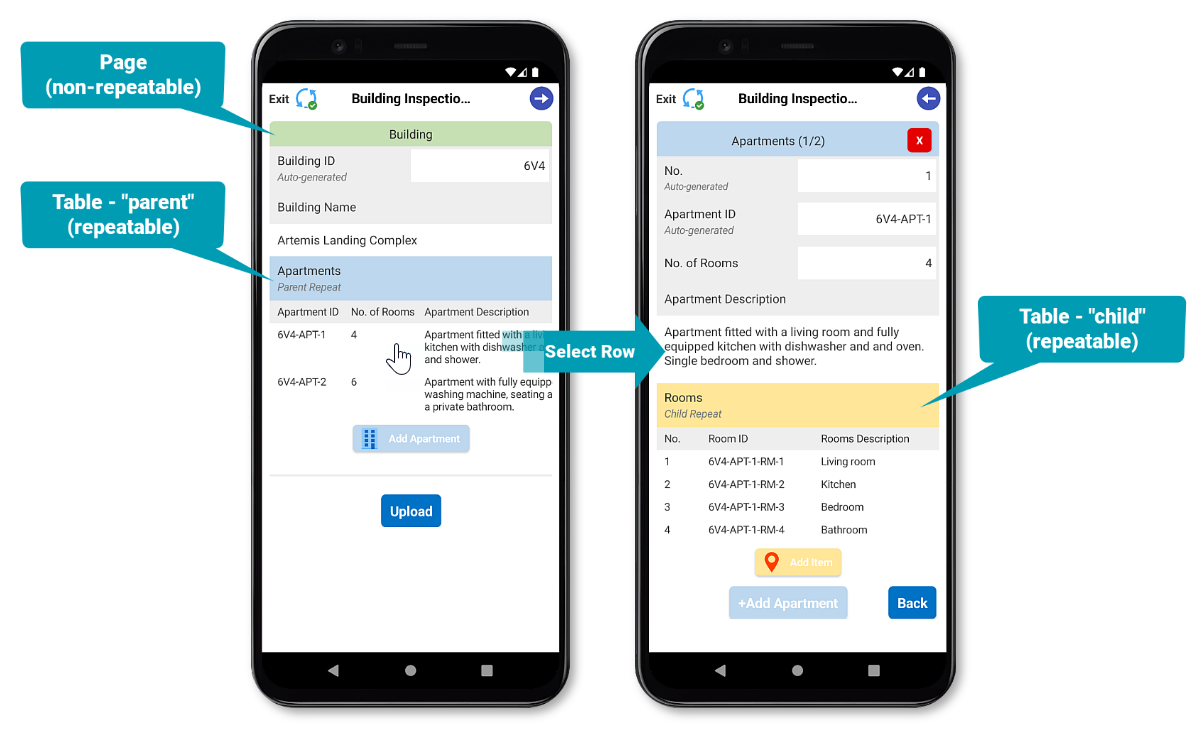
When in the form designer, add a Table field (parent) and populate it with additional fields, Then drag and drop another Table field (child) into the parent table, and populate with additional fields.
Custom Outputs
Besides our pre-built outputs (Classic Grey, App Layout and Smart Layout) you can also customize your own templates to populate the data from Nested tables.
The standard repeat syntax can be used in custom Word or Excel templates to display repeatable and non-repeatable captured data legibly.
{{!REPEATROW}}
{{!REPEATSTART}}
{{!REPEATEND}}
The following example demonstrates a custom Word template using repeat row syntax for parent and child repeats and non-repeatable captured data in a few configurations.
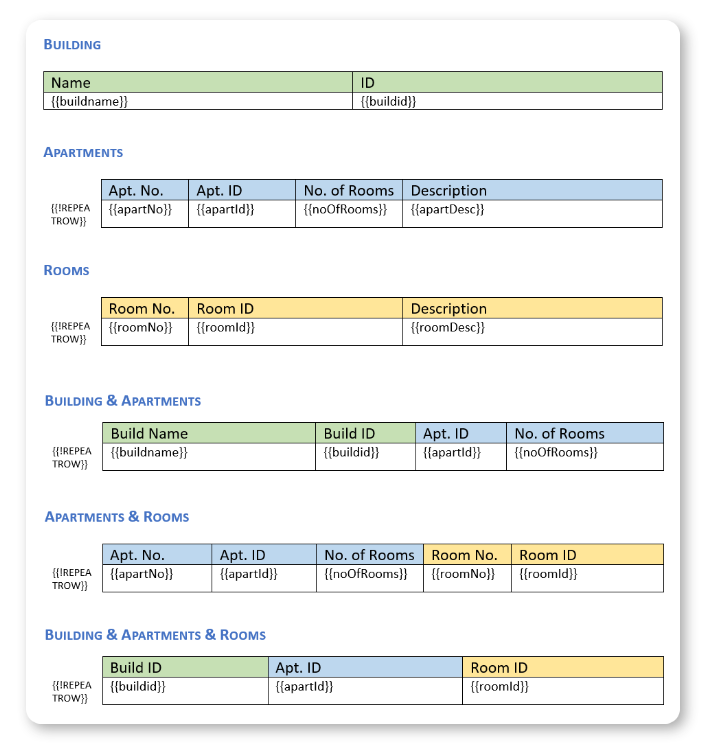
It isn't necessary to have double "REPEATSTART" or nested "REPEATROW" tags anywhere in your template to output data from your parent and nested child repeats.
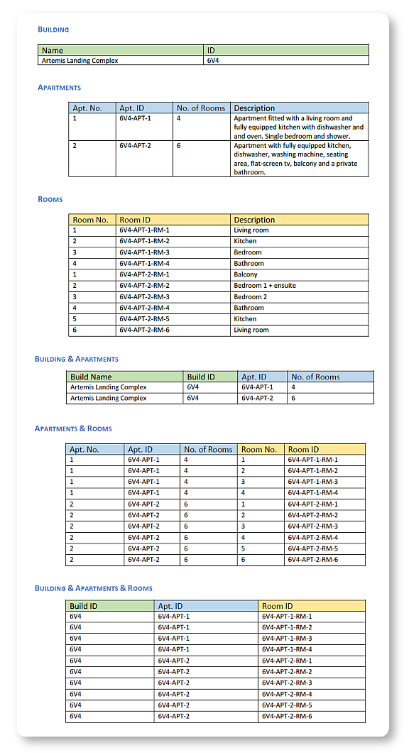
The custom PDF output will look like this...
Limitations
Nested repeats support the following:
- Maximum of 2 levels (parent repeat > child repeat).
- Configuration of a Table field (child) within another table (parent) ONLY.
- The child table doesn't support Populate from a Data Source.
Related Articles
Nesting Repeatable Data
Capturing structured, repeatable data is essential for many workflows, from property audits to equipment inspections. However, some scenarios require additional repetition, such as rooms within apartments or components within a machine. The most ...Capturing Repeatable Data
There are 3 field types that enable you to capture data on a repeating basis: the Page field, the Table field and the Gallery field. You can use any of these 3 repeatable field types to enable your users to capture multiple data entries. Please note ...Repeatable Data in Templates
After capturing repeatable data, you might want to customize how it displays in a PDF output using Word or Excel templates. There are two ways to output the answers for these repeatable fields in your template: Repeat rows in a Word table or Excel ...Capturing Repeatable Data
Three field types enable you to capture data repeatedly—the Page, Table, and Gallery fields. You can use either of these 3 repeatable field types to enable your users to capture multiple data entries. Identifying how you want to capture multiple sets ...Making fields in a repeating table required
The following workaround can be used to enforce that a field within a repeating table be required for the user to complete, even if the table is not required. Add a hidden field inside the table field {{tally}} with the following Dynamic Value, with ...