Salesforce
TABLE OF CONTENTS

A Premium connector for direct connection to Salesforce. Our platform enables you to quickly and easily connect to objects on your Salesforce account.
This enables a one-way synchronization to occur - where any Form output files are pushed to Salesforce objects.
Before you add a Salesforce Connector, you must ensure that you have a valid Salesforce Connection set up on your organization.
Adding a Salesforce Connector to your Form
The Form Connectors page can be accessed from your Form designer page, Form settings page or the Screens listing if you mouse over the Form row in question.

Once you are in the Connectors page, setting up a Salesforce Connector is easy:
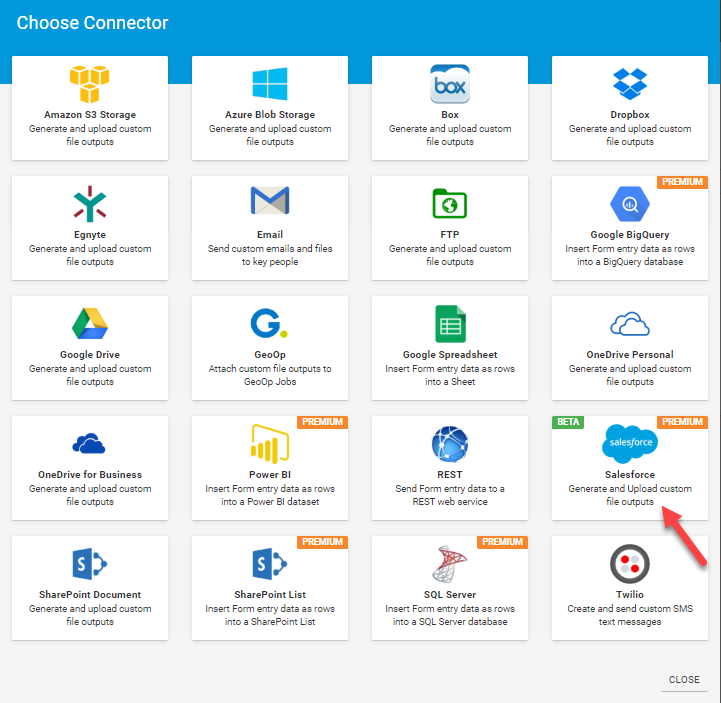
1. Click on the "ADD CONNECTOR" button to see a list of the available Connectors.
Then click the Salesforce option.
This will refresh the page and display your Connector, ready for configuration.
Note: At this stage, nothing has been saved. You must click on the Save button to save your connector after you've finished setting it
This will refresh the page and display your Connector, ready for configuration.
Note: At this stage, nothing has been saved. You must click on the Save button to save your connector after you've finished setting it up.
Configure your Salesforce Connector
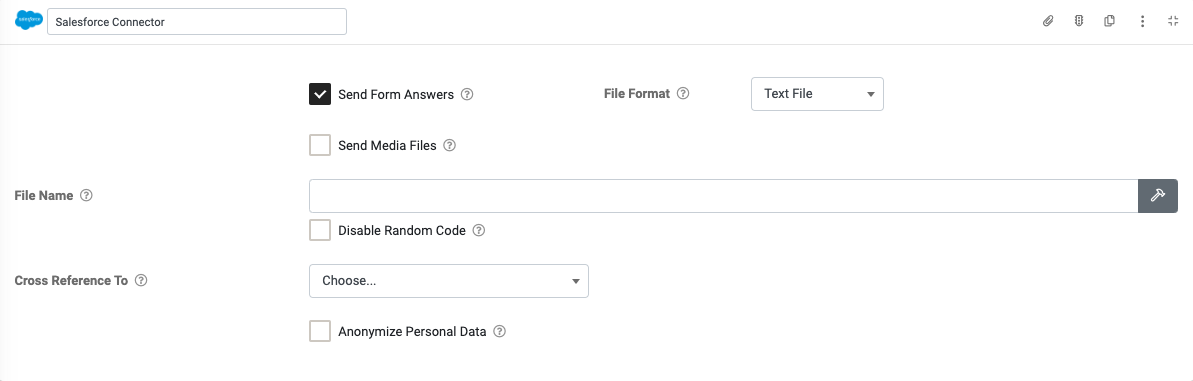
- Send Form Answers - You can choose what format you want your Form entry data to be sent as.
- CSV: Sends a Form data as a CSV file attachment on the email.
- Excel: Sends a Microsoft Excel attachment, which is generated using an Excel XLSX template you upload.
- PDF: Sends a PDF file attachment on the email, generated using either a generic PDF output or the Word/Excel template provided.
- Text File: Sends Form data as a Text File attachment on the email.
- Word: Sends a Microsoft Word attachment, which is generated using a Word DOCX template you upload.
- Send Media Files - Allows you to attach which media files to be included in the email.
The Connector will send/attach all media captured in the Form entry (photos, videos, etc.) as separate files with this option enabled.
This is in addition to any generated answer/template output of the connector.
NOTE: If the Anonymize Personal Data option is enabled, media files marked as Personal Data will be excluded. - File Name - Optionally enter a custom file name of your choice. You can also create a dynamic attachment name using fields from your Form: hit the hammer icon to bring up the text builder and build the file name. The file extension (.pdf, .xlsx, .docx etc) will be added to your name automatically. The generated file name including the extension may not exceed 120 characters.
- Cross Reference To - Use this option to reference a Salesforce Entity dynamically, with the Entity's Id sourced from the answer of the chosen Form field.
- Anonymize Personal Data - If enabled, data from fields marked as Personal Data will be converted to a non-human-readable format to aid privacy.
At this stage, your Connector is ready to go. Hit the SAVE button to save your changes and activate the Connector.
Related Articles
Salesforce
Our platform enables you to quickly and easily connect your data sources to Salesforce Objects. This enables a one-way synchronization to occur - where any changes in the Salesforce Objects are downloaded into your data source on a regular basis. ...Adding a Salesforce Connection
TABLE OF CONTENTS Configuring Salesforce Creating a New Connected App (Settings Required) Manage Connected App Configuring the Salesforce Connection To add a Salesforce Connection, go to the Connections page which is accessed via Menu -> Connected ...