
Authenticating a connection to PostgreSQL enables communication between the two platforms. This must be successfully added before Form Connectors can push or Data Source Connectors can pull data.
TABLE OF CONTENTS
Adding a PostgreSQL Connection
The Connections area of the platform is where you can add connections for connectors. Navigate on the side menu to Connected Data > Connections.
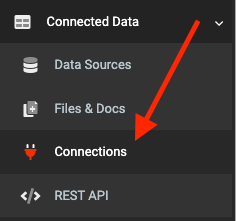
On the Connections page:
- Click the ADD CONNECTION button on the top right to bring up a list of connections
- Click on PostgreSQL option to add the connection.
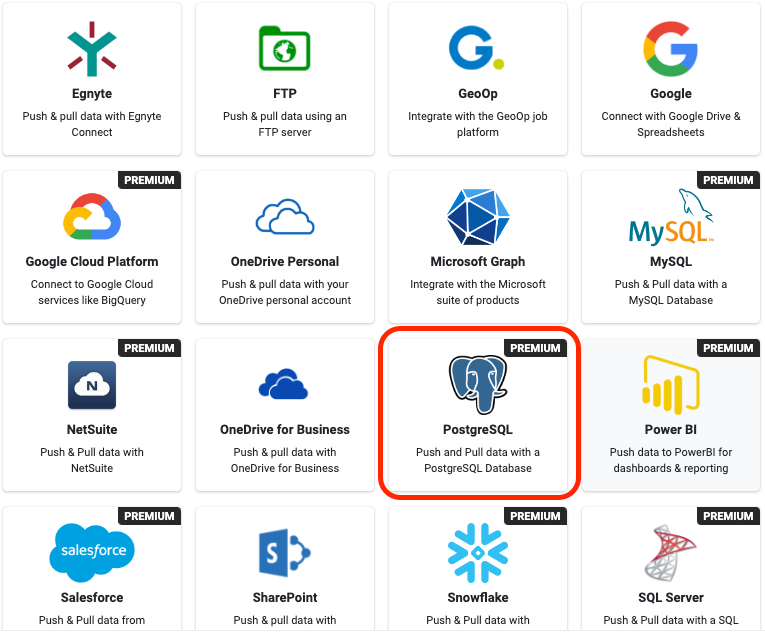
Authenticating PostgreSQL
After adding a connection, fill out all the required properties.

Connection String
Add the PostgreSQL Connection String to be used by connectors to access your database.
You must included the Server, Database, User Id, and Password credentials in the string.
The PostgreSQL user specified must have at least CONNECT, USAGE, CREATE, SELECT, INSERT, and DELETE privileges assigned. For the most straightforward configuration grant all privileges to the user.
Encrypted Connection PostgreSQL will automatically, by default, encrypt the connection if possible. This option will ensure that the Connector uses SSL encryption for all data sent between the platform and your PostgreSQL server.
Click the SAVE on the top-right to store your configuration and automatically verify the connection.
Additional Info
- PostgreSQL connections are only available on Premium accounts, and they must be added by an Administrator level user to see the option.
- The default port for PostgreSQL is 5432. You must ensure this port is open on your firewall and is configured to accept connections form our cloud servers.